

An Amaze GO! Alternative You Can Play in the Browser
Amaze GO! is an install-first mobile puzzle. Arrow Game is the same arrow-clearing itch, opened in a browser tab, with levels that are generated to always be solvable.
People who search for an Amaze GO! alternative almost never want a different puzzle. They want the same one — read the board, work out the order, watch the arrows leave — without an install standing between them and the first move.
This is a fair comparison, written by the people who make one of the two games. Where Amaze GO! is the better pick, that is said plainly below.
What Amaze GO! is
Amaze GO! is an Android puzzle game from Oakever Games, listed free with ads and an optional "Turbo" purchase that removes them. Its rule is the one every arrow puzzle is built on: launch each arrow towards the edge of the board without it running into another arrow. Pick wrong and the arrow is blocked; pick right and the board empties one lane at a time.
If you want to see that rule without installing anything, a separate browser game called ArrowsGo runs the same idea — a main route of around 700 hand-built levels, a random board, and a five-minute Challenge mode. It is not published by Oakever Games as far as we can tell, and we make no claim about a link between the two; it is simply the closest thing to Amaze GO! that opens in a tab.
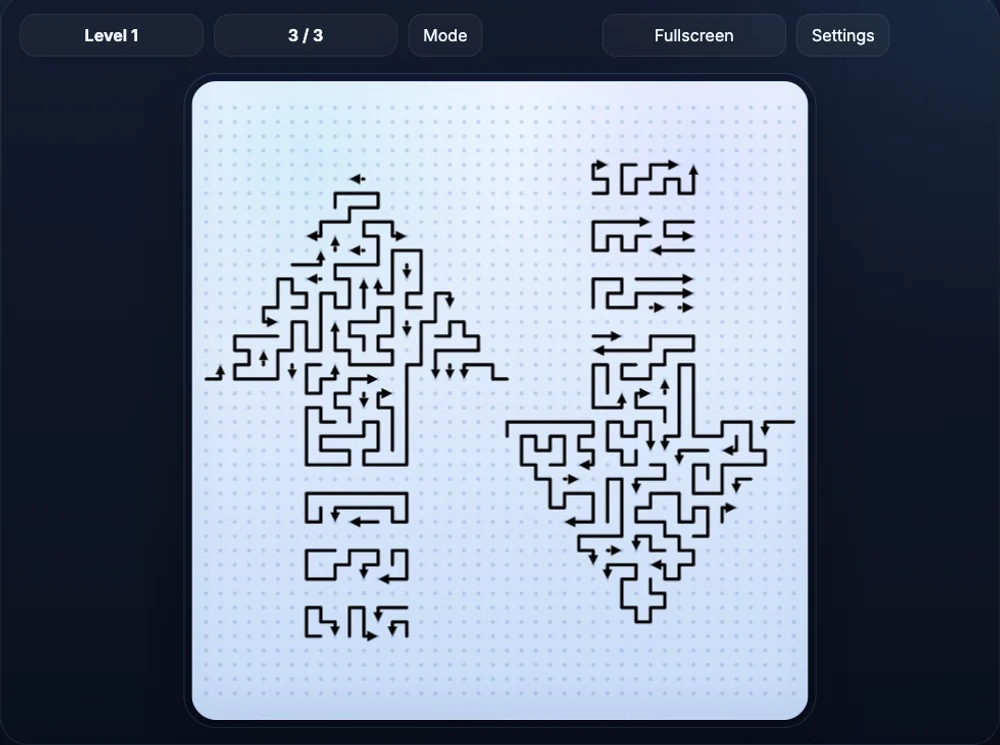
Those levels are drawn by hand as long, thin paths on a dotted grid. It is a dense look, and on a phone it rewards pinch-zoom — which is exactly why the settings panel offers line-width and mono/colour controls.
What Arrow Game is
Arrow Game is the same core rule with a different surface. Each arrow is a solid, colour-coded tile. A chain of tiles is one piece: the body arrows point at the next cell, and the head arrow points at the exit. Tap it and the whole chain crawls out along the head's line — unless another piece is sitting on that line.
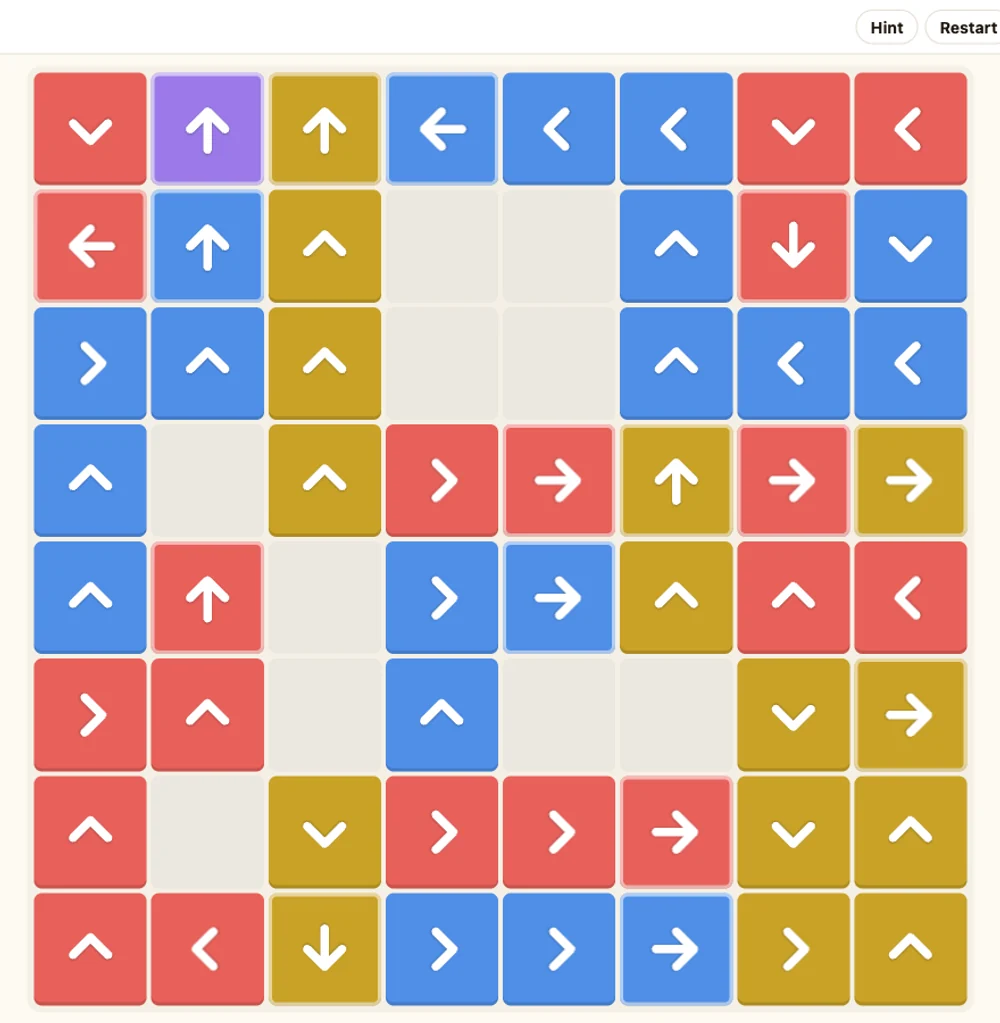
You read it at arm's length rather than by zooming in. That is the main trade-off between the two: fewer arrows per screen, each one legible at a glance.
Side by side
| Amaze GO! | Arrow Game | |
|---|---|---|
| Where it runs | Android app, install required | Any browser, desktop or phone |
| Account | Not needed | Not needed |
| Price | Free with ads; Turbo removes them | Free |
| Levels | ~700 hand-built (browser version) | Generated, one per level, endless |
| Solvable? | Hand-checked | Guaranteed by construction |
| Modes | Main route, random, 5-minute challenge | One progressive ladder |
| Board | Line paths on a dotted grid | Colour-coded tiles, 4×4 up to 8×8 |
| Extras | Skins, line width, mono/colour, zoom | Hint, restart, sound, fullscreen |
Where Amaze GO! is still the better pick
If you want hundreds of levels that a designer sat down and shaped, Amaze GO! has them and Arrow Game does not. Hand-built levels can hide a specific idea — a trap that only works once, a shape that reads as a joke — and a generator does not invent those. If you want a timer to push against, that is theirs too. And if you would rather have the game on your home screen than in a tab, an app is an app.
Where Arrow Game is different
It opens in a tab. No store page, no install, no account. The board is on screen in about the time it takes to read this sentence.
Every level is solvable, by construction. Levels are not hand-checked and they are not random-with-fingers-crossed. The generator builds each board backwards: it places the pieces in the reverse of the order they will be removed, and a piece is only placed where its exit line is clear of everything already on the board. Removing a piece only ever frees cells, so a board that was built this way can never be walked into a dead end. Whatever order you clear it in, it comes out.
The board reads at a glance. Solid tiles, one colour per piece, no two touching pieces sharing a colour. Nothing to zoom into.
It remembers where you were. Your level and your sound setting are kept in your browser. No sign-in, nothing sent anywhere.
Keyboard works too. Every cell is a real button, so Tab and Enter play the game as well as tapping does.
Try it
The fastest way to find out whether the trade is worth it is to play one board.
It is on the front page — no menu to walk through. If it clicks, the levels keep coming; the board grows from 4×4 to 8×8 by level 13 and the pieces get longer from there.
New to this kind of puzzle? How to play Arrow Game covers the rule and the reading order that stops you wasting moves.